Dick pictures and videos
Browse the largest collection of dick pics and videos as stylish media galleries instead of walls
Show Reddit users posts
Discover posts by users that have them hidden on Reddit. See what people are actually posting there
Save your favorite content
Save and organize everything you like. Posts, users, and even new porn subreddits you stumble upon
Browse subreddits as feeds
Explore multiple subreddits at once as feeds. Browse excisting feeds, or customize your own one










Membership
Saved
Here is a quick summary of everything you have saved on ScrollBoy so far
Account
EmailOrganize sections and import new subreddits
Here you can create sections and organize and import new subreddits to them. Drag and drop subreddit buttons between sections. The sections also work as feeds that let you browse posts from those subreddits at once
Create new section
Import subreddits
Import new subreddits to ScrollBoy using the name, r/name, or the full subreddit link
Unsorted queue 0
Restore subreddits
You have removed subreddits that were initially loaded to the site when you signed up. You can use this function to restore those subreddits. Sections and subreddits you have added will remain as they are, they do not get deleted
Send questions or comments related to ScrollBoy using this form. You will get an answer by email
Sent. Thank you, an answer comes by email.
This quick guide will teach you how to use the ScrollBoy website and all its fabulous features
ScrollBoy memberships are paid with cryptocurrencies. This guide will teach you how to do it
The short version
Paying takes six steps. The same six are shown in pictures under the cards on your Account page, as a quick guide, and this page goes through each of them properly. The first three are a one-off: once you have a wallet with some Litecoin in it, paying for a membership is only the last three, and they take about a minute.
- Sign up for a free crypto wallet. Exodus, on your phone or computer.
- Buy cryptos for that wallet. A little Litecoin, bought inside the wallet with a debit card.
- Make sure they are in the wallet. Settled, not pending, before you go on.
- Press PAY NOW on ScrollBoy. The payment page opens in a new tab with an address and an amount.
- Send crypto from the wallet. That amount, to that address, from the wallet's Send screen.
- Wait for payment to complete. Five to fifteen minutes, then ScrollBoy says so and sends you an email.
What crypto is
Crypto is money that only lives on the internet. You keep it in a wallet app on your phone or computer, and you can send some of it to anyone in the world in a minute, a bit like sending a message. There is no bank in the middle: nobody asks what the money is for, nobody can take it back, and nothing about it lands on a card statement. That is why we take it. A card company wants to know what you are paying for, and keeps a record of it. Crypto does neither.
The coin we use is Litecoin. It is one of the oldest coins, it costs cents to send, and a payment is confirmed in minutes, while Bitcoin can take an hour. The payment page lets you pick other coins too, but every picture in this guide shows Litecoin, and it is the one to go with.
What you need
- A wallet app. That is where your coins live. The pictures show Exodus, which is free, simple, and runs on a phone or a computer. Trust Wallet works the same way.
- A little Litecoin in it. A few dollars more than the membership costs, so the fees on the way do not leave you short. Step 2 shows how to get it.
- A ScrollBoy account, signed in. The membership goes on the account you are signed in with when you press PAY NOW.
- Half an hour, the first time. Making the wallet and buying the coins is the slow part, and there is no clock on that part. The payment itself takes a minute, and from next month on, that is all there is to it.
Step 1: Sign up for a free crypto wallet
Install Exodus from the App Store, Google Play or exodus.com, and make a new wallet. It asks you for a password and gives you a set of security words. Write both down on paper and keep the paper somewhere safe. The words are the wallet: with them you can bring it back on any phone or computer, and without them nobody can, not even Exodus. Never type them into a website and never give them to anyone who asks. ScrollBoy will never ask for them, and neither will anybody honest.
There is no account in the usual sense: no email, no name. The app makes the wallet on your device, and the words are the only key.
Step 2: Buy cryptos for that wallet
You can buy Litecoin inside Exodus and pay with a debit card in your own currency. The selling is done by a partner company, Ramp in the pictures, and the coins land straight in your wallet. Buy a few dollars more than the membership costs: the seller takes a small cut, and there is a network fee when you send, so a little extra keeps you from coming up just short.
- Press Buy Crypto. It is right there on the first screen.
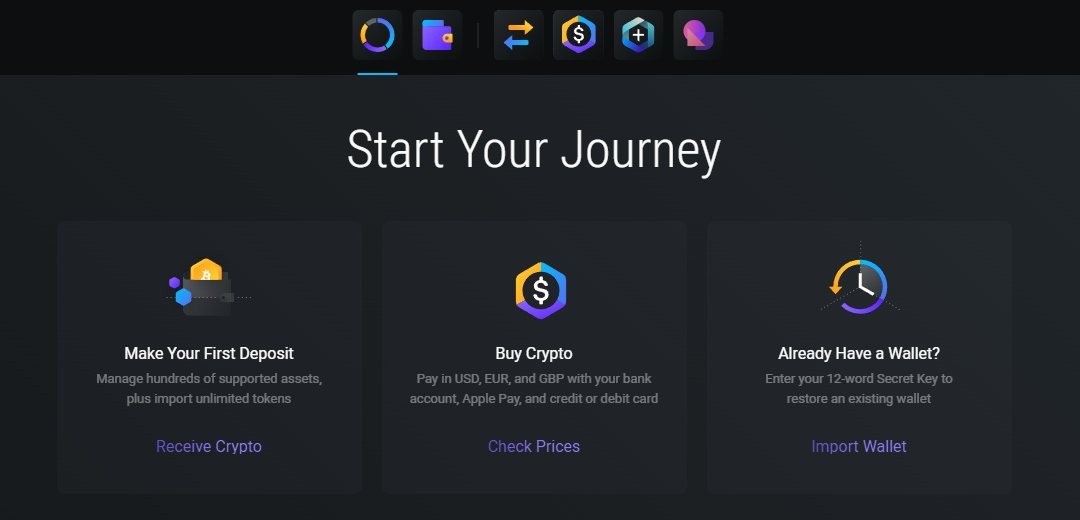
Exodus, the first screen: Buy Crypto. - Say how much, and pick Litecoin. You type an amount in your own money, and the screen shows how much Litecoin that buys. In the picture it is 25 dollars, which covers a month and leaves a little over.
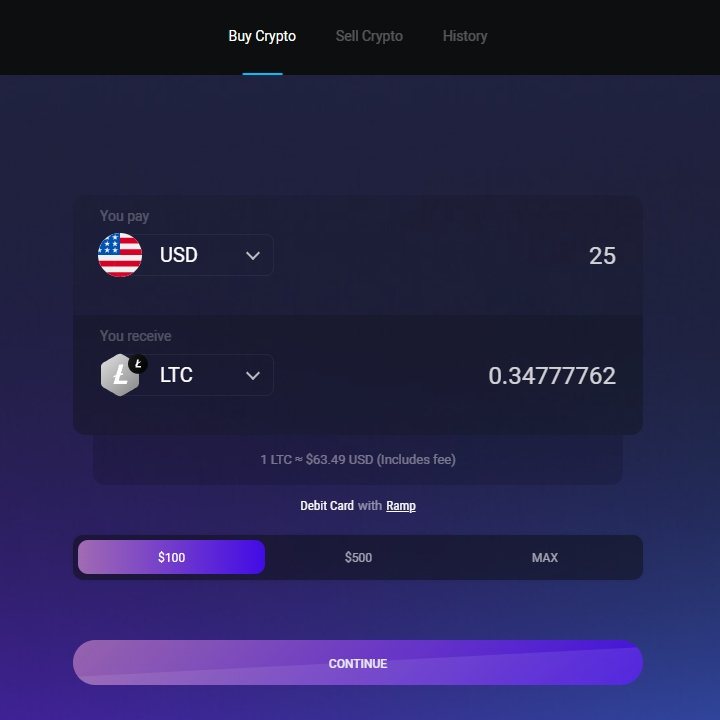
25 dollars in, Litecoin out. - Tell them who you are, once. The first time, the seller asks for an email, where you live, and a picture of your passport or driving licence. Anyone who sells crypto for money is required by law to ask, the same as a bank opening an account, and it is a one-off: the next time you buy, they already know you. It usually takes a few minutes, though their check can take longer.
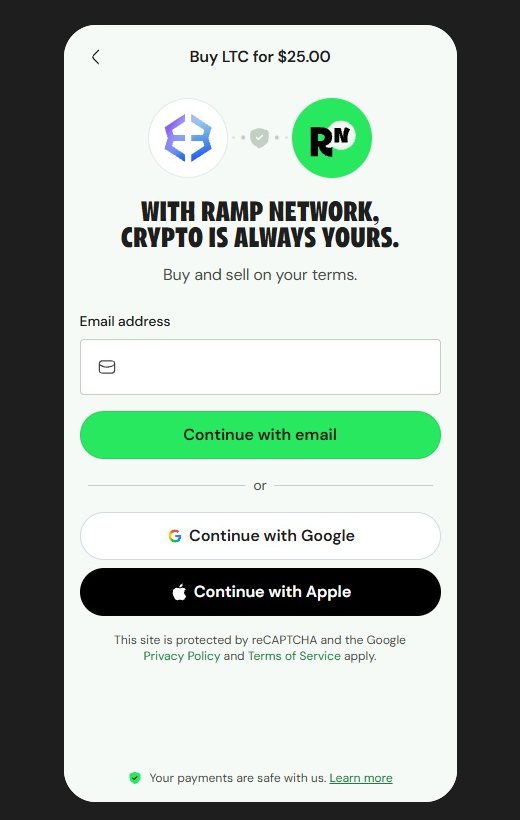
Ramp: sign in with an email. 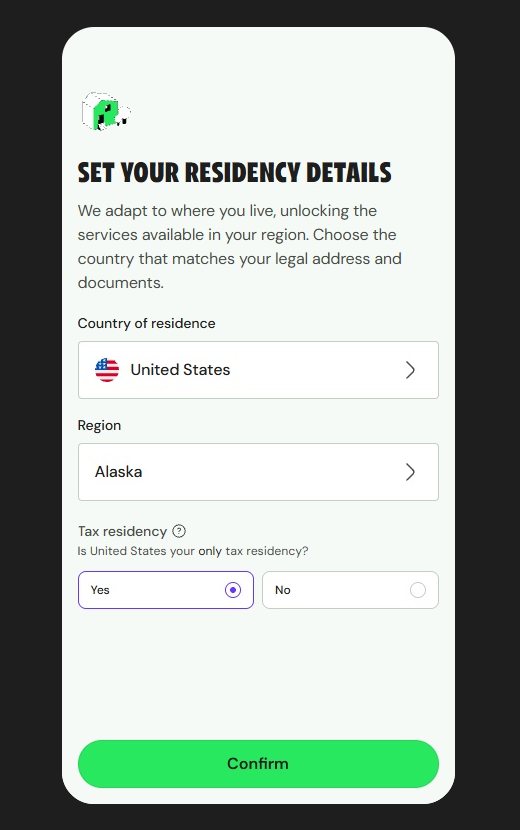
Then where you live, and after that your ID. - Pay with the card. Like any card payment on the web, with the bank's usual confirmation. The coins show up on the wallet's Litecoin page, usually within a few minutes.
If the bank says no. Some banks block crypto purchases on their cards. If yours does, buy on an exchange instead, such as Coinbase, Kraken or Firi, and move the coins to the wallet: in Exodus open Litecoin and press Receive, which shows your address; on the exchange choose Withdraw, pick Litecoin, paste the address, and say the wallet is your own if they ask. Do this well ahead of paying. Exchanges check every withdrawal, and that can take an hour, sometimes a day. And never pay ScrollBoy straight from an exchange: the payment page gives you ten minutes, and an exchange cannot promise to be that quick.
Step 3: Make sure they are in the wallet
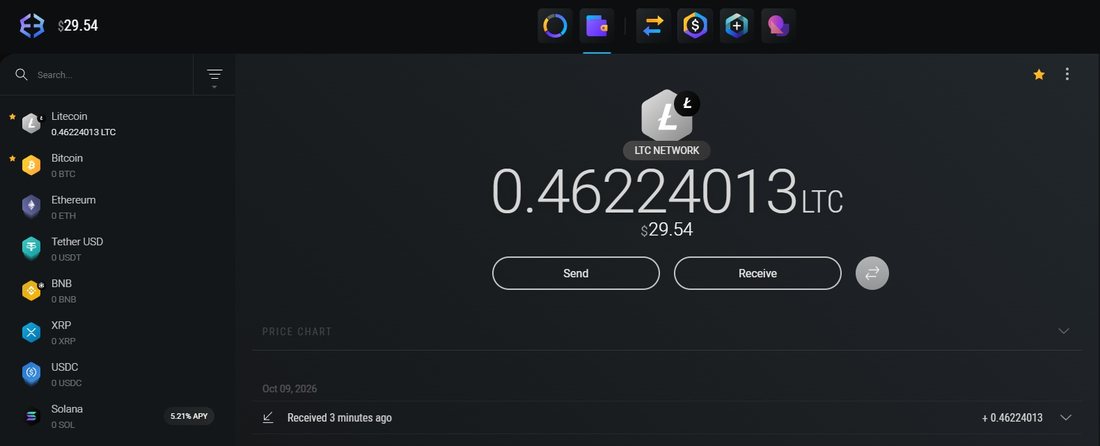
Before you go near PAY NOW, open Litecoin in the wallet and look at the balance. Coins that were just bought or moved in show as pending at first, while the network confirms them. That takes a few minutes, a little longer when the network is busy. Wait until the amount is settled and the wallet lets you send it. The payment page has a ten-minute clock, and it does not care that your coins are still on their way.
Step 4: Press PAY NOW on ScrollBoy
Sign in to ScrollBoy. If you have no membership yet, signing in takes you straight to your Account page, where the membership card is at the top: the plan, the price and the orange PAY NOW. Under the cards is the quick guide: the same six steps as here, in pictures.
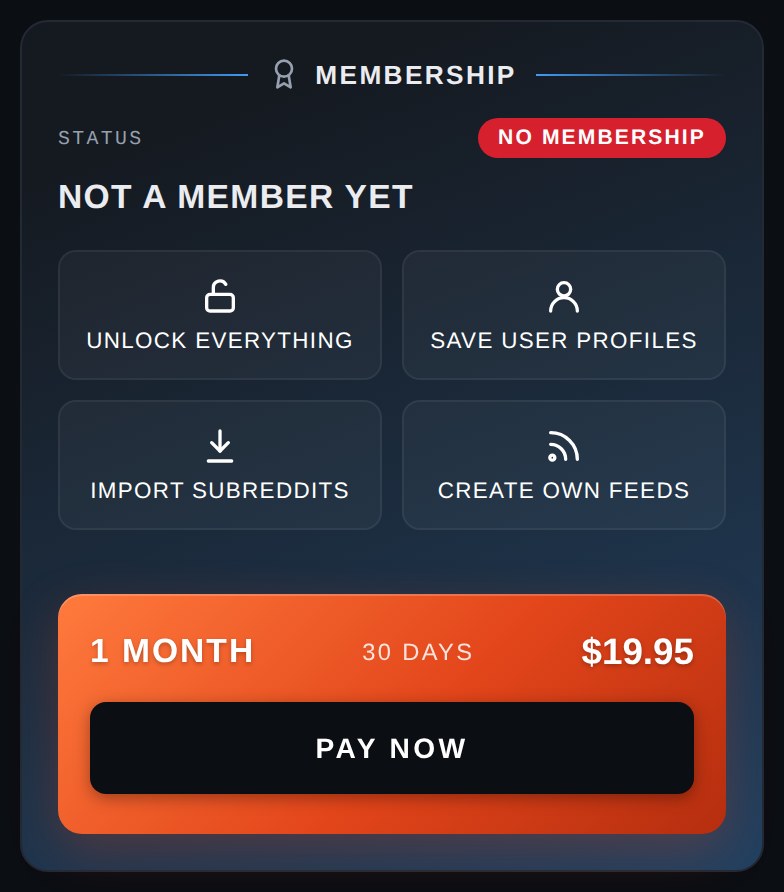
Press PAY NOW. The payment page opens in a new tab. It belongs to NOWPayments, the company that takes the coins for us. ScrollBoy stays open in the first tab, with a line under the plan saying it is waiting for the payment. Keep both tabs open. If your browser blocks the new tab, the payment page opens in the same tab instead and brings you back to ScrollBoy when it is done.
- Pick Litecoin and press Next step. The page lists the coins it takes. Choose Litecoin, and the page shows the price in Litecoin.
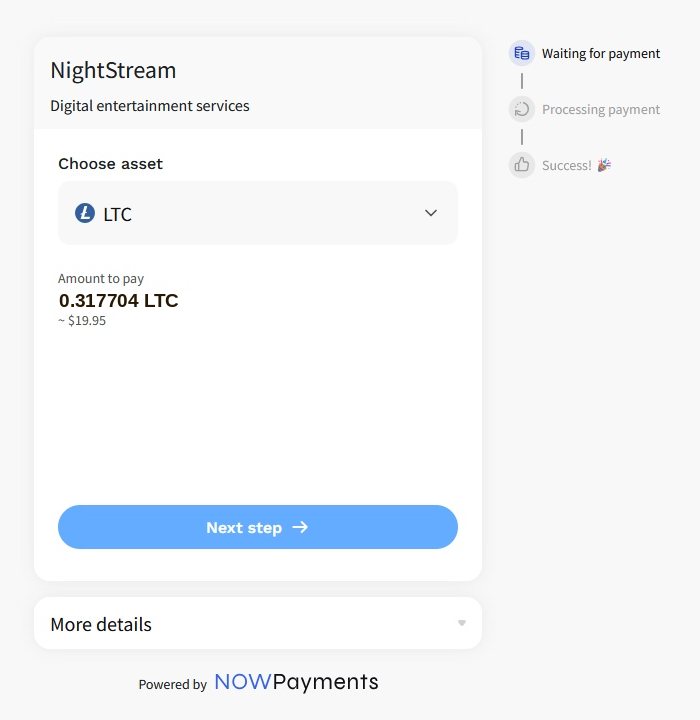
The payment page: Litecoin, and the amount to pay. - Copy the address and the amount. The address is a long string of letters and numbers, a kind of account number made for this one payment. The amount is exactly how much Litecoin to send. Use the copy buttons next to them; never type an address by hand. On a phone, the QR code holds the address, and the wallet's Send screen can scan it.
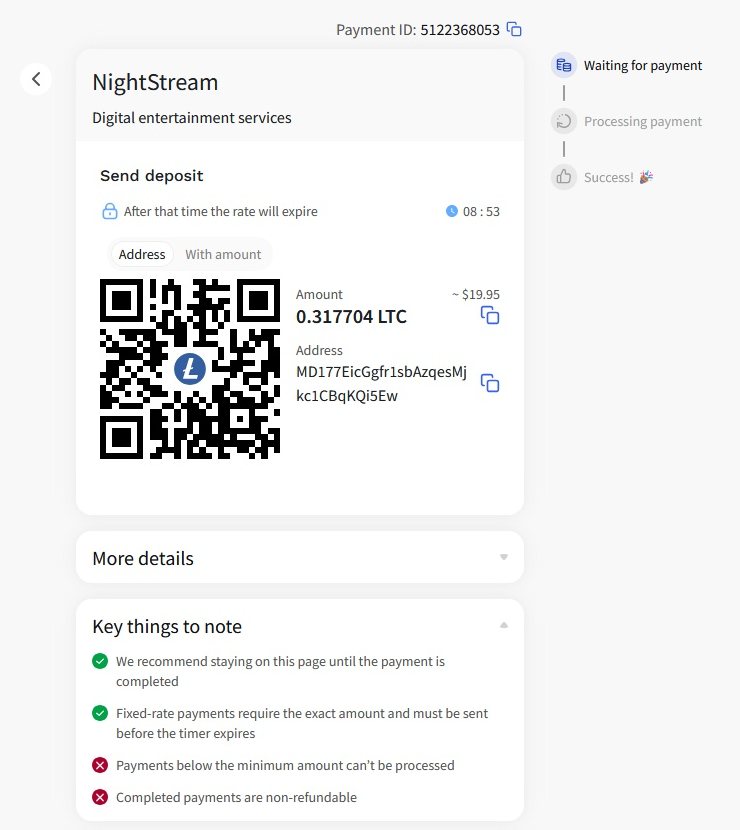
The address, the amount, the QR code and the clock.
The clock on the page gives you ten minutes, because the price in Litecoin is held for that long. That is plenty when the coins are ready in the wallet, which is why step 3 comes before this one.
Step 5: Send crypto from the wallet
- In the wallet, open Litecoin and press Send. Paste the address into the address box and type in the amount from the payment page, in Litecoin, not in dollars. On a phone, press the scanner icon and point the camera at the QR code instead of pasting.
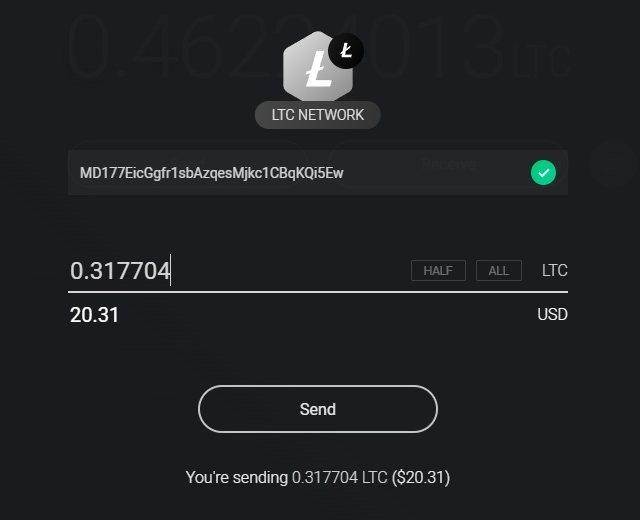
Send, with the address and the amount filled in. - Check the address. Compare the first four and the last four characters with the ones on the payment page. Crypto sent to a wrong address is gone for good, and nobody can get it back, so this is the one place to slow down.
- Press Send, then Send again on the check screen. The wallet shows the amount, the address and the network fee, a few cents, one last time. The fee is added on top, so the full amount arrives.
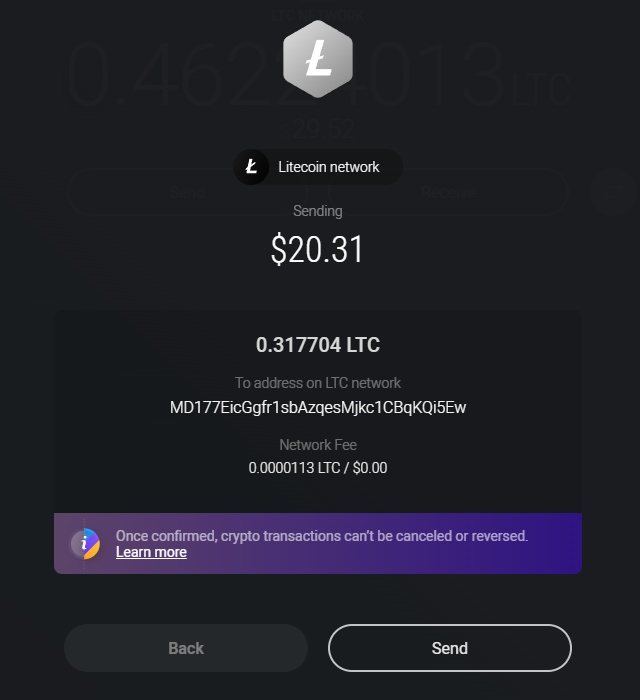
One last look, then Send.
Step 6: Wait for payment to complete
After a short while the payment page says Payment Processing: it has seen the coins coming and is waiting for the network to confirm them. There is nothing more to do there.
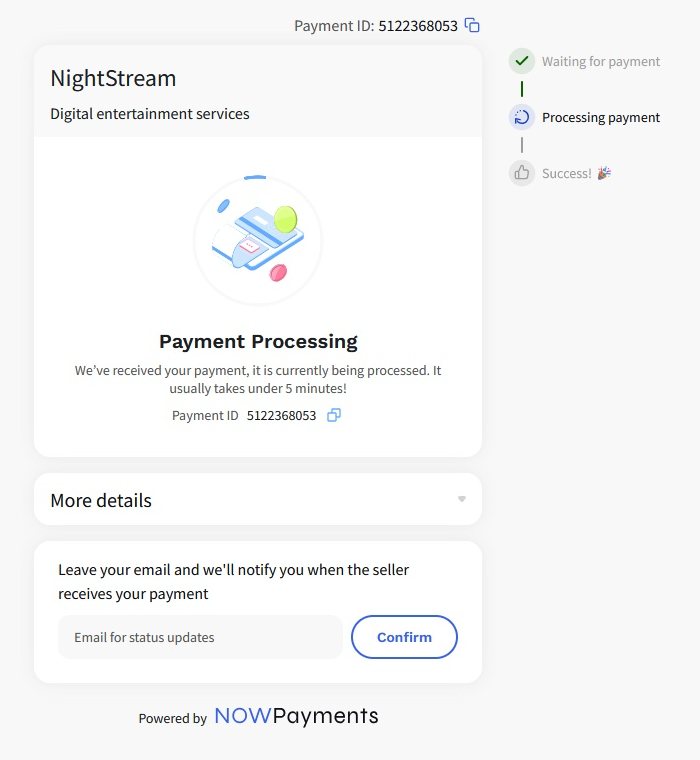
Go back to the ScrollBoy tab. The line under the plan changes to Payment seen as soon as the coins are spotted, and to Payment received. Your membership is now fully activated once the network has confirmed them. The card then says Active with the end date, the member features open, and an email saying the same goes to the address on the account. From Send to received usually takes five to fifteen minutes. You can close all the pages in between and come back later: the payment follows your account, not the tab. If ScrollBoy still shows the old line when you come back, refresh the page or check your email.
Two things worth knowing. The payment page is sometimes slower than ScrollBoy and keeps saying Payment Processing after the membership is already on: go by ScrollBoy and the email, not by that page. And whatever any page says, do not pay again. A payment that is on its way will get there.
If something goes wrong
- ScrollBoy says the payment came up short. A little less arrived than the page asked for, usually because a wallet or an exchange took its fee out of the amount instead of adding it on top. Send the small difference to the same address while the payment page is still open, or write to us through the contact form and we will sort it out.
- The clock ran out before you sent anything. Nothing happened and nothing was lost. Press PAY NOW again and you get a fresh address, a fresh amount and a fresh ten minutes. This time, have the coins settled in the wallet before you press it.
- The clock ran out after you pressed Send. Do not pay again. The coins still land on that address, but the page has stopped waiting for them, so the payment may need a hand to reach your account. Give it an hour. If the membership is still off by then, open the payment in the wallet's activity list and copy its transaction id, the long code the wallet shows for it. Then write to us through the contact form with the email on your account, the coin, the amount and that id. With those we can find the payment and switch the membership on by hand.
- You picked one coin on the page and sent another. Write to us the same way, with the same details. It takes longer to sort out and is not always possible, but write to us anyway and we will do what we can.
- You sent to the wrong address. Crypto sent to an address nobody holds is gone, with every coin and on every site, and we cannot get it back. That is why step 5 says to check the first and last four characters.
- PAY NOW says the payment page could not be opened. Wait a minute and press it again.
Next month
A membership runs for the time you paid for and then stops. Nothing is charged by itself: crypto cannot do that, which is part of why we use it. The Account page shows the end date all along, and three days before it you get an email. To carry on, press PAY NOW and send from the wallet, the same one-minute job as the first time. The new period is added after the old one, so paying early loses you nothing. Keep a little Litecoin in the wallet and you never need steps 1 to 3 again. If a membership lapses, nothing you saved goes anywhere: the member features close until it is paid again, and open the moment it is.
Questions
- Can I pay with Bitcoin or another coin? The payment page lists the coins it takes. Litecoin is the one we suggest: cents to send, minutes to arrive. Bitcoin works too, but the fee can run to several dollars and the confirmation can take an hour. Whatever the coin, send it to the address the page gives you for that coin.
- Phone or computer? Either. On a computer you copy and paste the address. On a phone you scan the QR code from the wallet's Send screen. The easiest of all is the wallet on the phone and ScrollBoy on the computer: the QR code on the screen, the camera in your hand.
- Does my bank see ScrollBoy? No. The only card payment in this guide is the purchase of the coins, and that goes to the seller. The payment to us goes from your wallet to ours, and no bank is involved.
- Where is my receipt? The email you get when the payment is in, with the plan and the end date. The Account page shows the same.
- Is a wallet safe? Exodus is one of the most used wallets there are, and the coins are in your own hands, not in a company's account: keep the security words safe and nobody else can touch them. The flip side is that nobody can help you if you lose the words. Hence the paper.
- Why not just take cards? A card company would know what you are watching, could stop a payment because of it, and keeps the record for years. Crypto has none of that. It is a little more work the first time, and none after.
What we keep
For every payment we keep the order reference, the plan, the dates, the coin and the amounts, and the email of the account it was for. No card, no name, no address, no bank. The payment itself sits on the coin's public ledger, like every payment in that coin, under the address it was sent from. The ledger holds addresses and amounts, not names, and nothing in it points at this site.